
If you are planning a wedding, you already know the list of things to track is long: guests, venues, vendors, payments, timelines, and a budget that seems to grow every week. A wedding planning spreadsheet in Google Sheets keeps all of it in one place, shareable with your partner and accessible from any device.
Below you’ll find our full collection of free wedding planning templates, plus a step-by-step guide to building your own from scratch if you prefer to start with a blank file.
Our Free Wedding Planning Spreadsheet Templates
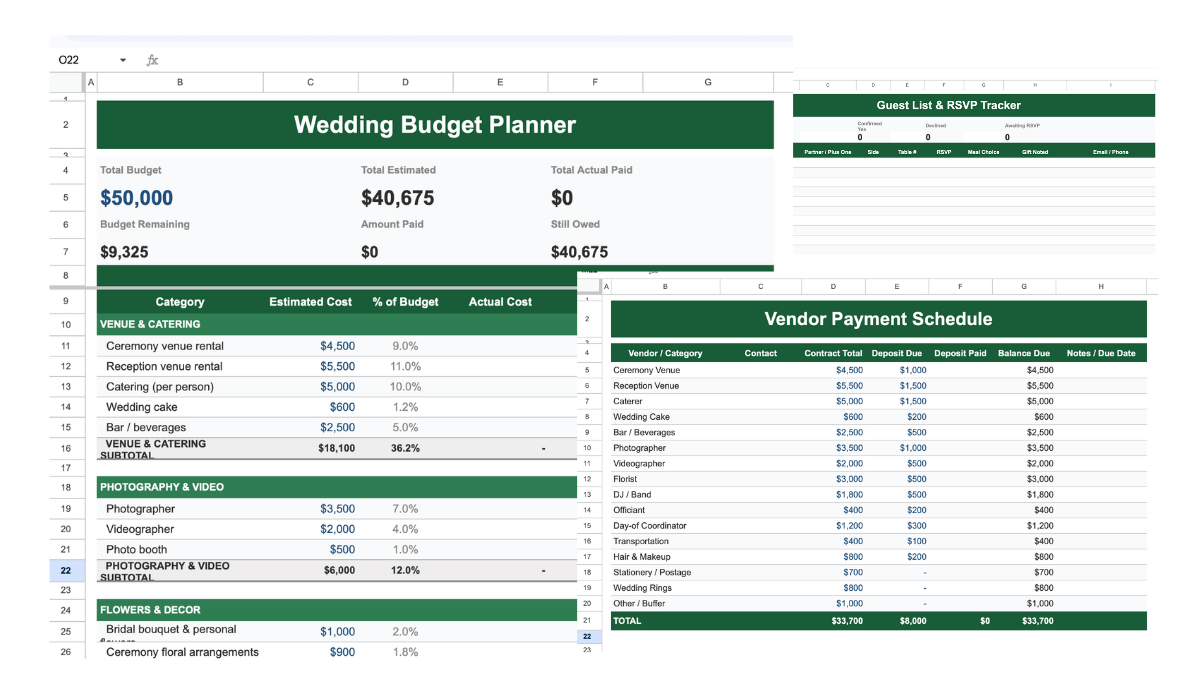
All-in-One Wedding Planning Spreadsheet (Featured)
The most complete option we offer. This single spreadsheet covers your full wedding budget with a live dashboard, a guest list with RSVP tracking, a vendor and supplier payment tracker, and a wedding day timeline, all in one file with four organized tabs. It is the best starting point if you want everything in one place rather than managing multiple separate sheets.
Get this template (requires a Google account). For a full walkthrough of how to use it, including a budget breakdown by category and tips on what couples most often forget, see our wedding planning spreadsheet guide.
Individual Templates
If you only need one piece of the puzzle, each of these templates covers a specific part of the planning process. You can also combine them into a single master spreadsheet using the instructions in the next section.
- Wedding Day Schedule: a time-blocked schedule for the full wedding day, from getting ready through the end of the reception. Includes a formula that automatically calculates each event’s start time based on the previous event’s duration. Get this template.
- Wedding Guest Planner: tracks guest names, addresses, contact details, RSVP status, meal choices, and table assignments. Includes checkboxes and dropdown menus for RSVP and invite status. Get this template.
- Wedding Venue Checklist: a structured checklist for evaluating and comparing ceremony and reception venues before you commit. Covers capacity, catering policy, parking, accessibility, and contract terms. Get this template.
- Wedding Supplier Checklist: a master list for tracking all suppliers across every category: caterers, florists, musicians, hair and makeup, and more. Includes columns for contact details, quotes, and booking status. Get this template.
- Wedding Photographer Contact List: built for comparing photographers, but works equally well for any vendor category. Duplicate the template to compare musicians, caterers, or florists side by side. Get this template.
- Wedding Budget Spreadsheet: a standalone budget spreadsheet with expense categories, estimated costs, and actuals. Automatically calculates whether you are over or under budget in each category. Get this template.
You may also want a project management spreadsheet to handle the smaller tasks and milestones that come with planning a wedding.
How to Combine Multiple Wedding Templates into One Spreadsheet
If you want to pull several of the individual templates above into a single master wedding planning spreadsheet, Google Sheets makes this straightforward. Here is how to do it:
- Open all the spreadsheets you want to combine so they appear at the top of your recent Sheets.
- In one of the sheets, click the small arrow next to the sheet name tab at the bottom of the page.
- Navigate to Copy to > Existing spreadsheet.

- In the menu that appears, select the destination spreadsheet.
- Click Select. The tab now appears in your destination file.


Repeat for each template you want to include. Alternatively, the wedding planning spreadsheet already has all four core tabs built in, so you don’t need to combine anything manually.
What to Include in a Wedding Planning Spreadsheet
A wedding spreadsheet works best when it focuses on the four things couples actively track throughout the planning process: the guest list, venues, vendors and suppliers, and the day-of schedule. Here is what to include in each.
Guest list
Your guest list is the foundation of the entire budget. It drives catering costs, venue capacity requirements, invitation quantities, and seating. Track names, contact details, RSVP status, meal choices, and table assignments. Include a running count of confirmed guests so your other estimates stay accurate as responses come in.
Venues
Track your ceremony and reception venues separately, including addresses, contact names, contract totals, deposit amounts, and balance due dates. Venues typically consume 25 to 30 percent of the total wedding budget, so locking in the actual contract figure early is essential for keeping everything else on track.
Vendors and suppliers
Keep a master list of every vendor and supplier involved in the wedding: caterers, photographers, florists, musicians, hair and makeup, transportation, and anyone else on contract. For each one, record the contact details, total contract value, deposit paid, and final balance due date. Missing a deposit deadline can cost you the booking entirely.
Ceremony and reception schedule
A detailed timeline helps everyone involved stay on the same page on the wedding day. Build two versions: a long-range planning timeline that tracks milestones from now through the wedding, and a day-of schedule with times, events, and who is responsible for each one. Share a read-only copy with your key vendors and suppliers in advance.
How to Make a Wedding Budget in Google Sheets
According to The Knot Real Weddings Study of 2026, the average US wedding cost $34,000 in 2025. Guest count is the single biggest driver of that number because it ripples across catering, seating, invitations, and venue size. Before you start entering line items, set a total budget number at the top of your spreadsheet and treat it as a constraint, not a suggestion.
A percentage-based model gives you a starting allocation across categories:
| Category | Typical % of Budget | Example at $25,000 |
|---|---|---|
| Venue (ceremony + reception) | 25-30% | $6,250-$7,500 |
| Catering and bar | 20-25% | $5,000-$6,250 |
| Photography and video | 10-12% | $2,500-$3,000 |
| Flowers and decor | 8-10% | $2,000-$2,500 |
| Music and entertainment | 5-8% | $1,250-$2,000 |
| Attire and beauty | 8-10% | $2,000-$2,500 |
| Stationery and postage | 2-3% | $500-$750 |
| Rings and officiant | 3-4% | $750-$1,000 |
| Coordinator and logistics | 4-5% | $1,000-$1,250 |
| Buffer (10% contingency) | 10% | $2,500 |
Set up five columns in your budget tab: Category, Estimated Cost, Actual Cost, Amount Paid, and Balance Owed. Add a summary row at the top that shows total budget, total estimated, and total actual spend. This gives you a real-time view of where you stand as purchases come in and contracts get signed.
For a full guide to building the budget tab, including the categories most couples forget (alterations, postage, gratuities, the marriage license), see the wedding planning spreadsheet guide.
How to Create a Guest List Tab in Google Sheets
Here is how to build a guest list tab from scratch:

- Add a header label by merging the top cells. Select the cells, click Format, choose Merge cells, then type your label. Adjust the font size, font color, and fill color using the main toolbar.
- Add columns for the data you need to track. At minimum: Guest Name, Plus One, RSVP Status, Meal Choice, Table Number, and Email or Phone.

- Format the cells with borders and fill colors to make the list easy to scan. Click the Borders button in the toolbar to add borders to any selection of cells.

- For yes or no columns like “Invite Sent,” add a checkbox. Select the cells, click Insert, then choose Checkbox.
- For columns with more than two options like RSVP Status, use a dropdown. Select the cells, click Data, then Data validation. Enter your options (Yes, No, Pending), then click Save.
Add a COUNTIF summary row above the table to automatically count confirmed, declined, and pending responses. This keeps your running guest count accurate without manually tallying rows.
We also have a dedicated wedding guest list template for Google Sheets with additional variants if you need a more detailed setup.
How to Build a Wedding Day Schedule in Google Sheets
A day-of timeline keeps you, your wedding party, and all your vendors on the same page from the first getting-ready call through the reception send-off. Here is how to build one:
- Create a header row by merging the top cells and entering the date and event name. Adjust the formatting to match your other tabs.

- Add three columns: Start Time, Duration, and Event Name. You can add a fourth column for Who Is Responsible to assign each item to a person or vendor.

- Format the Start Time and Duration columns as time values. Select the cells, click Format, then Number, then Time.
- In the Start Time cell for the second event, enter the formula =(previous start time) + (previous duration). This calculates each subsequent start time automatically. You only need to enter the first event’s start time manually and then adjust durations as your schedule evolves.
Once the timeline is finalized, share a read-only version with your vendors and suppliers by clicking Share and setting the permission to Viewer.
Frequently Asked Questions
What should a wedding planning spreadsheet include?
A complete wedding planning spreadsheet should cover four areas: a budget tracker with estimated and actual costs, a guest list with RSVP status and meal choices, a vendor and supplier tracker with deposit and balance due dates, and a wedding day timeline. You can manage these as separate templates or combine them into one file using the tab-copy method described above. The wedding planning spreadsheet includes all four tabs in a single ready-to-use file.
How do I make a wedding budget in Google Sheets?
Set up columns for Category, Estimated Cost, Actual Cost, Amount Paid, and Balance Owed. Add a summary row at the top that calculates your total budget, total estimated spend, and total actual spend using SUM formulas. Group your line items by category (venue, catering, photography, etc.) and enter a hardcoded total budget figure at the top. Google Sheets will show you in real time whether you are over or under budget in each category as you update the actuals.
What is the best free wedding planning spreadsheet?
For most couples, the best option is a single spreadsheet that covers budget, guests, vendors, and timeline in one place rather than four separate files. The wedding planning spreadsheet includes all four tabs with pre-built formulas, dropdowns, and a live budget dashboard. You can make a free copy directly in Google Sheets.
How do I track RSVPs in Google Sheets?
Add a dropdown column to your guest list tab with three options: Yes, No, and Pending. Use COUNTIF formulas in a summary row above the table to automatically count how many guests fall into each status. This keeps your confirmed headcount accurate without manual tallying, which matters because guest count directly affects your catering estimate and seating plan.
What percentage of a wedding budget should go to the venue?
Venue costs for both ceremony and reception typically account for 25 to 30 percent of the total wedding budget. Catering and bar add another 20 to 25 percent. Together, venues and catering consume roughly half of most wedding budgets. According to The Knot Real Weddings Study, the average US wedding cost $34,000 in 2025, with guest count being the single biggest driver of total spend.
Can I combine multiple wedding spreadsheets into one?
Yes. Open the spreadsheets you want to combine. In one of them, click the small arrow next to the sheet tab name, select Copy to > Existing spreadsheet, then choose your destination file. Repeat for each tab you want to add. Alternatively, the all-in-one wedding planning spreadsheet already has all four core tabs built in, so no combining is needed.
What is the average cost of a wedding in 2026?
According to The Knot Real Weddings Study, the average US wedding cost $34,000 in 2025. That figure skews high because a small number of couples spend significantly more. The median is closer to $20,000 to $22,000 in most markets outside major cities. Regional variation is substantial: venues in New York or San Francisco can run two to three times the cost of comparable spaces in smaller metros.
Do I need a separate spreadsheet for vendors and suppliers?
A dedicated vendor tab is worth building because most vendors require a deposit at booking and a final balance payment weeks before the wedding. A flat contact list does not capture payment timelines. Your vendor tracker should include the contract total, deposit amount, deposit due date, deposit paid status, final balance due date, and balance paid status. This prevents missed payments that could cost you a booking.