
Most freelancers track revenue. Some track expenses. Almost none track the five or six numbers that actually determine whether the business is growing, shrinking, or just spinning.
Revenue is a lagging indicator. By the time you notice it dropped, the cause happened weeks or months ago: you stopped sending proposals, a big client churned, your rates fell behind your costs. The numbers that prevent those surprises live upstream.
Here is the full system, built around three free spreadsheet templates. It covers income goals, pipeline health, financial health, and personal capacity. Each section below explains what to track and how to set it up.
The Five Categories That Actually Matter
Income
Monthly revenue, average project value, and effective hourly rate. Effective hourly rate is total revenue divided by total hours worked, not your quoted rate. Most freelancers find there is a gap. That gap is worth knowing.
Pipeline
Proposals sent, close rate, and pipeline coverage (total value of open proposals divided by remaining revenue target). If your close rate is 30% and you need $10,000 more this quarter, you need $33,000 in open proposals. Anything less and the math does not work.
Delivery
Projects completed, on-time delivery rate, and average project duration. These numbers reveal capacity. If your average project takes three weeks and you have four active projects, you are at capacity regardless of what your calendar looks like. Log project start and close dates in a running tab. The patterns show up fast.
Financial Health
Monthly expenses, savings rate, and tax set-aside balance. Savings rate is the number that tells you whether freelancing is building wealth or generating activity. The formula: (Revenue - Expenses - Tax Set-Aside) / Revenue. Gross revenue means nothing if 90% of it is gone before you see it.
Personal
Hours worked per week, days off taken, energy level. These are easy to dismiss as soft metrics. A freelancer working 65-hour weeks with no days off is not building a business. They are running a burndown chart with themselves as the resource.
Setting Up Your Freelancer Goal Tracker
Pick your primary income goal. For most freelancers, this is annual revenue. If your target is $120,000 for the year, open the goal tracker spreadsheet and configure it: set the goal type to Numeric, enter January 1 as the start date and December 31 as the end date, set the starting value to your year-to-date revenue, and set the target value to $120,000.
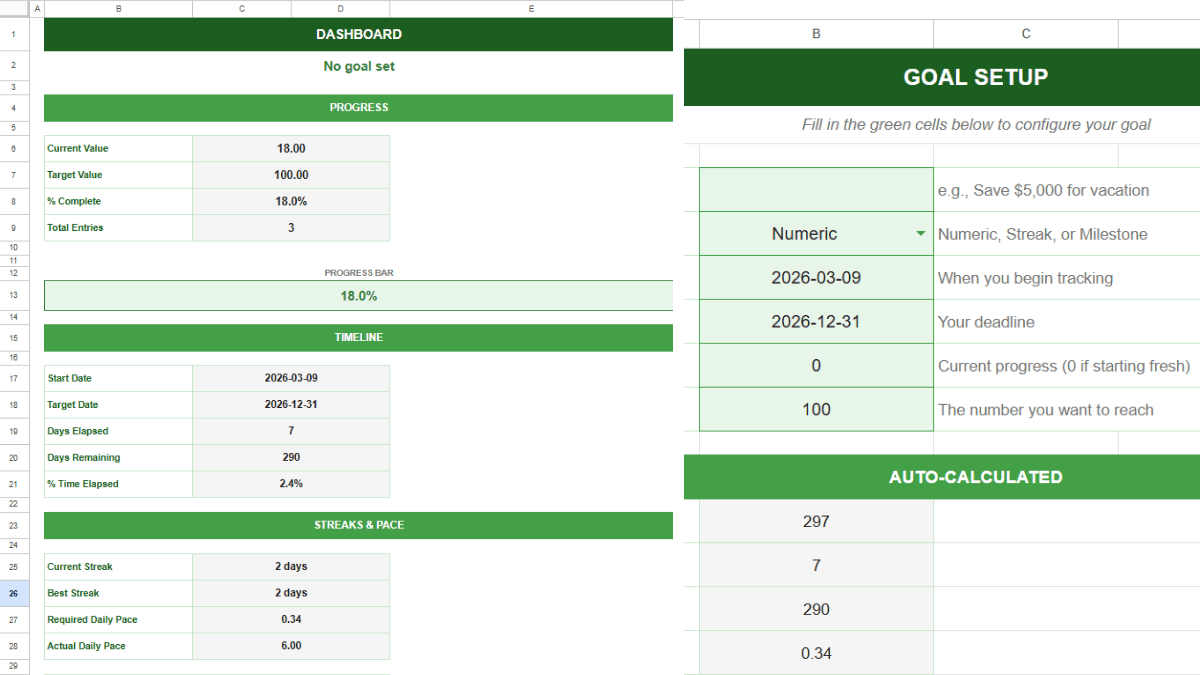
The template calculates your required daily pace. For a freelancer logging weekly, that translates to a weekly revenue benchmark. Every Monday, enter your cumulative revenue in the Daily Log. The Dashboard shows whether you are ahead of pace, on track, or behind. One number, one screen.
If you prefer to work in quarterly sprints (and most freelancers should, because annual targets feel abstract by March), set up a new file each quarter with a $30,000 target and a 90-day window. The shorter timeframe makes the pace status more responsive and the weekly check-in more actionable.
The goal tracker answers one question: am I on pace to hit my revenue target? It does not replace a payment log. For tracking individual invoices, payment status, and quarterly tax estimates, the freelancer income tracker handles that side. Use both. The income tracker logs what you got paid and what you owe. The goal tracker tells you whether the pace will get you where you need to be.
Tracking Client Pipeline
Revenue tells you what already happened. Pipeline tells you what is about to happen. A freelancer with $8,000 in revenue this month and $0 in proposals has a problem that will not show up in the income tracker for another 30 to 60 days.
Set up a second goal tracker file for pipeline activity. The target could be proposals sent per month (if volume is your bottleneck) or pipeline dollar value per quarter (if deal size is the lever). Track it the same way: weekly log, pace status, dashboard.
The two trackers work together. If your revenue goal tracker is green but your pipeline tracker is red, you are coasting on existing work and not replacing it. That is the most dangerous position for a freelancer, because everything looks fine until it suddenly does not. The pipeline tracker catches the gap before it becomes a revenue gap.
If your pipeline is red for two consecutive weeks, stop whatever else you are doing and send proposals. The delivery work can usually absorb a short delay. An empty pipeline cannot.
Tracking Financial Health Alongside Income
Revenue is vanity. Profit is sanity. Savings rate is survival.
A freelancer earning $10,000 a month with $9,200 in expenses and no tax set-aside is in worse shape than one earning $6,000 with $3,500 in expenses and 25% going to a tax account. The goal tracker will show the first freelancer as ahead of pace on revenue. The expense tracker reveals the full picture.

The expense tracker template handles monthly expense logging with category breakdowns and a summary dashboard. Run it alongside your income goal tracker. At the end of each month, calculate your savings rate: (Revenue - Expenses - Tax Set-Aside) / Revenue.
A healthy savings rate for a freelancer is 20% or higher after taxes. Below 15% and you are one slow month away from dipping into reserves. Below 10% and there are no reserves. There is just a timing problem between invoices.
If you want to track a specific savings target (emergency fund, equipment purchase, retirement contribution), set up another goal tracker file for it. The template works the same way whether the number is revenue, dollars saved, or any other metric you can log weekly.
The Monthly Freelancer Review
Block 30 minutes on the last Friday of each month. Open every tracker. Work through these five questions in order.
Am I on pace for my income goal? Check the income tracker’s Dashboard. If green, note it and move on. If yellow or red, look at the Daily Log to find where progress stalled and whether the cause is fixable (slow invoicing, delayed project starts) or structural (lost a client, rates too low).
Is my pipeline healthy enough to sustain next month? Check the pipeline tracker. Calculate coverage: total open proposals divided by next month’s revenue target. Below 2x coverage means you do not have enough pipeline to hit your number even with a strong close rate. Above 3x means you have breathing room.
Am I keeping what I earn? Check the expense tracker. Calculate this month’s savings rate. Compare it to last month. If it is dropping, find the category that grew. Subscriptions, subcontractors, and dining out are the three that creep up most often for freelancers.
Am I maintaining capacity to keep working? Look at hours worked this month and days off taken. A freelancer who worked every day for four weeks straight is borrowing from next month’s energy. Log your hours in a simple tab or a time tracker. If your worst revenue weeks consistently line up with your highest-hour weeks, the data makes the connection obvious.
What needs to change next month? One or two adjustments, written down. “Send three more proposals per week” or “raise project minimum to $3,000” or “take Saturdays off.” Not a full strategic overhaul. Just the one or two levers that the data says matter most right now.
This review compounds. After six months, you have a detailed record of how your freelance business actually operates: which months are strong, where pipeline dries up, what your real expenses look like, and how your energy affects output. That record is worth more than any business plan, because it is built from data, not assumptions. Start with the goal tracker and the first Monday log entry. Everything else follows from there.
Frequently Asked Questions
What is the difference between a goal tracker and an income tracker?
They answer different questions. The income tracker is a log: what you got paid, from whom, and when. It tracks individual invoices and helps you stay on top of outstanding payments and quarterly tax estimates. The goal tracker is a pace tool: it takes your cumulative revenue and tells you whether you are on track to hit your target by the deadline. Use both. The income tracker is the record. The goal tracker is the speedometer.
How do I calculate my effective hourly rate as a freelancer?
Divide your total revenue for a period by the total hours you worked during that period. Not your quoted rate, not your retainer rate. Actual dollars received divided by actual hours logged. Most freelancers find their effective rate is 20% to 40% lower than their project rate once you account for admin time, revisions, and unpaid sales hours. Tracking it monthly in a simple log will show whether it is trending up or down.
How many spreadsheets does this system require?
Three to four, depending on your setup. The freelancer income tracker for logging payments and invoices. One goal tracker file for your revenue target. A second goal tracker file for pipeline activity. And the expense tracker for monthly costs and savings rate. Each one takes about 10 minutes per week to maintain once it is configured. The monthly review pulls them all together.
How do I set a realistic annual income goal as a freelancer?
Start with last year’s revenue. If you earned $95,000, a 15% to 20% growth target ($109,000 to $114,000) is aggressive but achievable for most freelancers who are actively improving their pipeline or raising rates. If you are in your first year, estimate based on your current monthly average multiplied by 12, then discount by 20% to account for slow months you have not experienced yet.
Should I track income by client or in aggregate?
Track aggregate revenue in the goal tracker for pace status. Track revenue by client in a separate tab or spreadsheet for concentration risk. If one client accounts for more than 40% of your income, you do not have a freelance business. You have a job with invoicing. The per-client view surfaces that risk before it becomes a crisis.
How do I handle irregular income months?
The goal tracker handles this naturally. A $2,000 month followed by a $15,000 month both show up in the cumulative progress. The pace status adjusts automatically. The key is to keep logging every week even in slow months. A string of low entries followed by a spike is useful data. A gap in the log is not.
What is pipeline coverage and why does it matter?
Pipeline coverage is the total dollar value of your open proposals divided by the revenue you still need to close. If you need $10,000 more this quarter and you have $30,000 in outstanding proposals, your coverage is 3x. At a 30% close rate, 3x coverage means you will likely close $9,000 of that $30,000, putting you just short of target. Most freelancers should aim for 3x to 4x coverage to account for deals that stall, shrink, or disappear.
Can I use this system if I have a day job and freelance on the side?
Yes. The system scales down. Your income target will be lower, your available hours fewer, and your pipeline activity smaller, but the tracking framework is the same. A side freelancer tracking $2,000 per month gets the same value from pace status and pipeline coverage as a full-time freelancer tracking $10,000 per month. The numbers change. The system does not.
How do I track taxes owed throughout the year?
Set aside a fixed percentage of every payment received (25% to 30% for most US freelancers) in a separate savings account. Track the balance in a goal tracker file with a target equal to your estimated annual tax liability. This prevents the quarterly estimated tax payment from being a surprise. If you want more detailed expense and income categorization, the expense tracker template has category breakdowns that map to Schedule C line items.