
Annual goals lose focus by March. Weekly goals lack strategic weight. A quarter is long enough to accomplish something real and short enough that the deadline still matters. Businesses figured this out decades ago, which is why earnings are reported quarterly and strategic plans run in 90-day cycles. Your business goals should follow the same rhythm.
The Spreadsheet Framework for Quarterly Goals
Most quarterly planning fails because it stays abstract. “Grow revenue” doesn’t cut it. “Add $12,000 in new MRR by June 30” works. The difference is a number, a deadline, and a way to measure whether you’re on pace.
A spreadsheet forces that specificity.
Layer 1: Focus Areas
Pick three to five areas that matter this quarter. Revenue growth, customer retention, product launch, hiring, operational efficiency. These are broad categories, not targets. They answer one question: where should effort go for the next 90 days?
Layer 2: Measurable Targets
Each focus area gets one or two targets with a specific number attached. Revenue growth might break into “close 15 new accounts” and “increase average deal size to $8,000.” Retention might be “reduce monthly churn to under 3%.” Every target needs a current value, a target value, and a deadline. If you can’t attach a number, it isn’t ready to track. A SMART goals template can help you pressure-test each target before you commit to it.
Layer 3: Weekly Checkpoints
This is where most goal-setting systems fall apart. You define the targets in January and don’t look at them again until March. A weekly checkpoint row in the spreadsheet fixes this. Every Monday, you log your current value for each target. The spreadsheet calculates the rest: pace status, gap to target, whether you need to accelerate or hold steady.
Setting Up Your Quarterly Goal Tracker
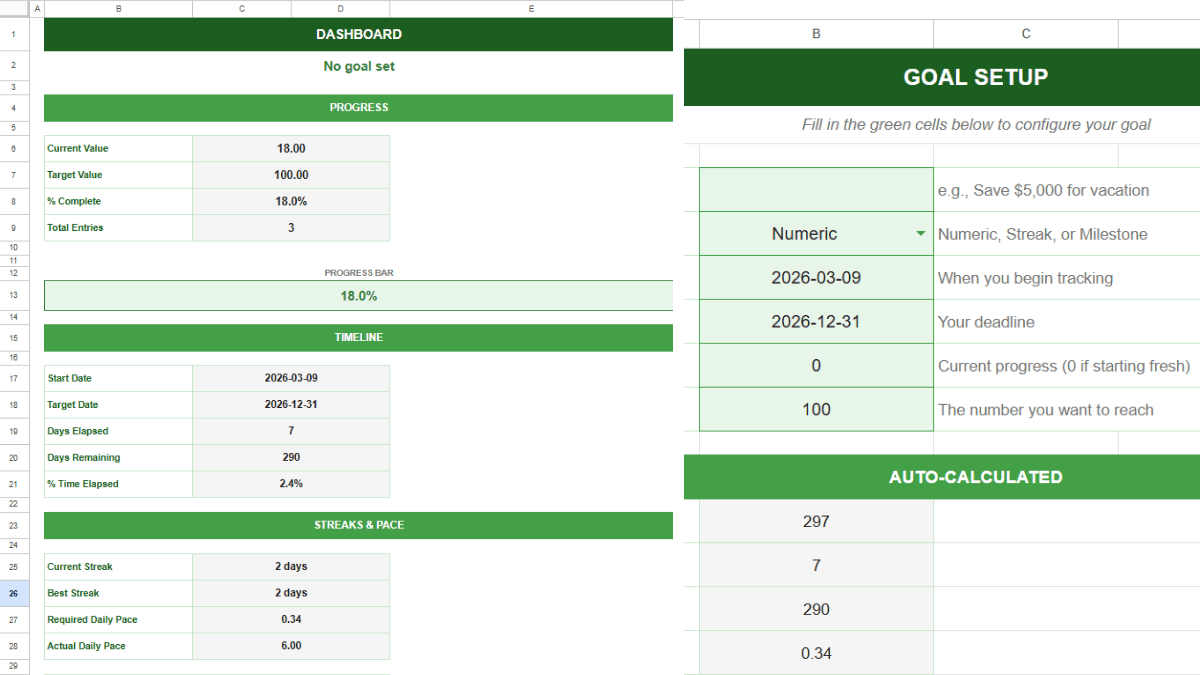
The goal tracker spreadsheet handles most of this out of the box.
Open the Goal Setup tab. Enter your goal name (e.g., Q2 New Account Revenue). Set the goal type to Numeric. Enter the start date of the quarter and the end date. Set the starting value to wherever you are right now. Set the target value to the number you need to hit.
The template calculates your required daily pace automatically. For quarterly business goals, you’ll likely check in weekly instead of daily. That works. Go to the Daily Log tab and enter one row per week. Put the date (Monday of each week) in column A and your current cumulative value in column B. The remaining columns, including change, cumulative progress, and percent complete, populate from formulas.
The Dashboard tab shows your pace status at a glance. Green means ahead of pace. Yellow means close. Red means behind. Share this tab with stakeholders or pull it up during your weekly team sync. One screen, one answer.
For each focus area, duplicate the entire spreadsheet file and rename it (e.g., “Q2 Goal Tracker: Revenue” and “Q2 Goal Tracker: Retention”). One goal per file keeps the data clean and the dashboard focused.
Running Your Weekly Check-In
Block 15 minutes every Monday morning. Open each goal tracker file. Enter the current value.
Pace status. Green, yellow, or red. This is the single most important indicator. It compares your actual rate of progress to the rate you need.
Percent complete vs. percent of time elapsed. If you’re 40% through the quarter but only 25% toward your target, the gap is visible immediately. Being “25% done” means nothing without knowing how much time has passed.
Notes column. Write down what happened last week that moved the number or stalled it. Two sentences. This context is invaluable during the end-of-quarter review and prevents the “I have no idea why we missed this” conversation in March.
The weekly check-in isn’t a planning session. It’s a measurement session. You look at the data, note the status, and adjust effort for the week ahead. Behind pace means you increase activity. Ahead means you hold steady or reallocate time to a lagging goal. Small corrections early prevent large gaps later.
End-of-Quarter Review
When the quarter closes, open each goal tracker’s Dashboard tab. The numbers are already there. Nothing to compile.
For each goal, answer three questions:
Did you hit the target? The percent complete cell gives you the answer. Above 100% is a hit. Above 75% is a partial hit. Below 75% needs an honest look at why.
Was the target realistic? Check the pace status history in the Daily Log. If you were red from week two onward, the target may have been wrong from the start. That’s useful information for next quarter.
What did the Notes column reveal? Scroll through 12 to 13 weeks of context. Patterns show up here that are invisible in the dashboard. Maybe every week you fell behind was a week with client emergencies. Maybe every jump happened after a specific type of outreach. These patterns shape next quarter’s strategy.
Export or screenshot each dashboard for your records. Then set up the next quarter. New files, new targets, same framework. If a goal carries forward, start a fresh tracker with a new baseline. The old file becomes your historical record.
If your business uses objectives and key results, the OKR template for Google Sheets pairs well with this system. Define the objectives and key results there, then use the goal tracker to measure pace against each key result throughout the quarter. For teams managing project-level tasks alongside strategic goals, a project management template handles the day-to-day work while the goal tracker keeps the bigger picture visible.
Frequently Asked Questions
How many goals should I track per quarter?
Three to five. More than five and you dilute focus. Fewer than three and you probably aren’t pushing hard enough. Each goal should be meaningful enough that hitting it would noticeably change your business by the end of the quarter.
Can I track team goals and individual goals in the same spreadsheet?
You can, but it gets cluttered fast. One file per goal is cleaner. Team goals get their own trackers. Individual goals (like sales targets per rep) get separate files shared between the manager and the employee. The dashboard tab works the same way regardless of who owns the goal.
What if my goal doesn’t have a numeric target?
Find a proxy metric. “Improve customer experience” isn’t trackable. “Reduce average support ticket resolution time to under 4 hours” is. “Launch the new website” is a milestone goal. Set Target Value to the total number of milestones (wireframes approved, content written, staging deployed, live) and increment as each one completes.
How do I share quarterly progress with stakeholders?
Share the Dashboard tab directly in Google Sheets. Set permissions to “view only” for stakeholders who shouldn’t edit the data. The dashboard updates automatically whenever you log new values, so they always see the latest status without asking for a report.
Should I use OKRs or simple targets?
Depends on the size of your team. OKRs work well when you need alignment across multiple people or departments, because they connect individual key results to a shared objective. If you’re a solopreneur or running a team under 10, simple numeric targets with pace tracking are usually enough. You can always layer OKRs on top later.
What happens if business conditions change mid-quarter?
Adjust the target, not the system. If a major client churns or a new opportunity appears, update your Target Value in the Goal Setup tab. The pace calculation recalibrates automatically. Note the change and the reason in the Daily Log so you have context when you review the quarter.