Skip to content
Search Linkedin-in Youtube
Newsletter
  • Google Sheets Tips
  • Formulas
  • Charts & Graphs
  • Top Courses
  • Templates
  • Excel Guides
  • Articles
  • Google Sheets Tips
  • Formulas
  • Charts & Graphs
  • Top Courses
  • Templates
  • Excel Guides
  • Articles
  • Google Sheets Tips
  • Formulas
  • Charts & Graphs
  • Top Courses
  • Templates
  • Excel Guides
  • Articles
  • Google Sheets Tips
  • Formulas
  • Charts & Graphs
  • Top Courses
  • Templates
  • Excel Guides
  • Articles

symbols

How to Insert Symbols in Google Sheets
May 6, 2026December 8, 2022 Talha Faisal
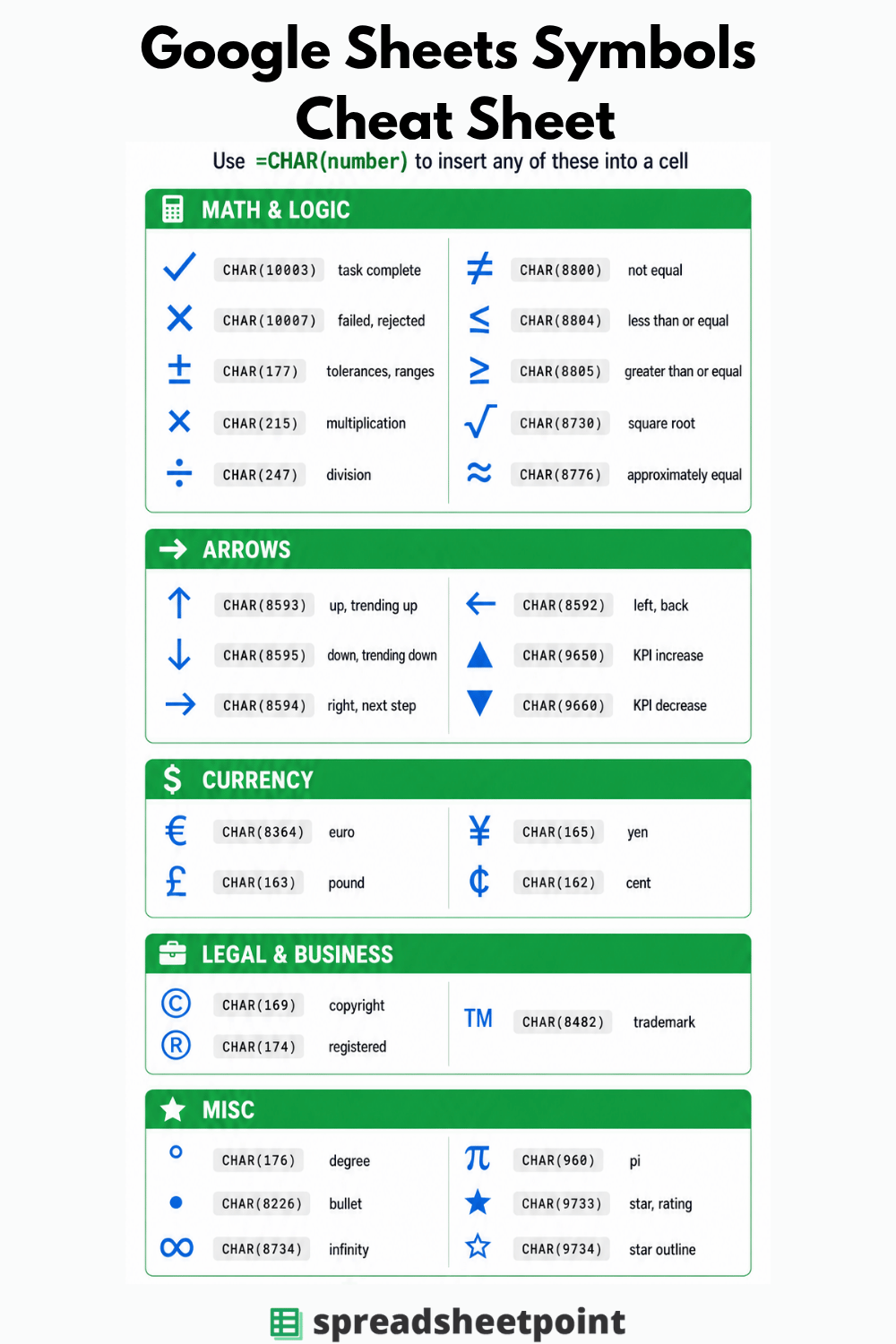
Infographic poster titled โ€œGoogle Sheets Symbols Cheat Sheetโ€ Subtitle reads: โ€œUse =CHAR(number) to insert any of these into a cell.โ€ The design has a white background with dark charcoal text, green section headers, and blue symbol icons. Content is organized into five sections in a clean two-column grid. Each entry shows a large symbol, its CHAR code in a gray rounded label, and a short description. Math & Logic section: Check mark CHAR(10003) task complete; X mark CHAR(10007) failed/rejected; plus-minus CHAR(177) tolerances/ranges; multiplication CHAR(215); division CHAR(247); not equal CHAR(8800); less than or equal CHAR(8804); greater than or equal CHAR(8805); square root CHAR(8730); approximately equal CHAR(8776). Arrows section: Up arrow CHAR(8593) trending up; down arrow CHAR(8595) trending down; right arrow CHAR(8594) next step; left arrow CHAR(8592) back; solid up triangle CHAR(9650) KPI increase; solid down triangle CHAR(9660) KPI decrease. Currency section: Euro CHAR(8364); pound CHAR(163); yen CHAR(165); cent CHAR(162). Legal & Business section: Copyright CHAR(169); registered CHAR(174); trademark CHAR(8482). Misc section: Degree CHAR(176); bullet CHAR(8226); infinity CHAR(8734); pi CHAR(960); star CHAR(9733); star outline CHAR(9734). Footer text reads โ€œSpreadsheet Pointโ€

Learn how to insert symbols and special characters in Google Sheets using the CHAR function, Google Docs, or Alt codes with a full symbol reference table and CHAR codes for 30 common symbols.

Categories Google Sheets Tips Tags formulas, google sheets formulas, special characters, symbols

Master Spreadsheets in Excel and Google Sheets!

Subscribe to our free newsletter to supercharge your sheet skills

Itโ€™s time to make your spreadsheets work for you, not the other way around!
ย 

SpreadsheetPoint

About Us

Contact

Write For Us

Sitemap

Our Policies

Terms and Conditions

Disclosure Policy

Privacy Policy

Disclaimer

Popular Spreadsheets Topics

How to Highlight Duplicates in Google Sheets

Count Cells with Text in Google Sheets

IF CONTAINS Google Sheets Guide

VLOOKUP From Another Sheet in Google Sheets

Google Sheets Date Picker

Google Sheets Currency Conversion

Google Sheets Sum of Column Guide

Popular Excel Topics

Pull Data From Another Sheet in Excel

Guide to Excel Version History

How To Compare Two Excel Files

Google Sheets Templates

Google Sheets Calendar Templates

Google Sheets Expense Tracker

Google Sheets Project Management

Google Sheets Itinerary Templates

Google Sheets Content Calendar

Investment Tracker Spreadsheet

Course Reviews

Best Google Sheets Courses

Best Free Spreadsheet Software

Best Excel Courses

Best Google Data Studio Certifications

Youtube Linkedin
ยฉ 2026 Spreadsheet Point. All rights reserved