
A net worth spreadsheet reduces your entire financial life to one number: everything you own minus everything you owe. That single figure, tracked monthly, tells you more about your financial progress than any budgeting app or bank statement can on its own.
I built a free net worth tracker template for Google Sheets that handles the structure and formulas for you. You make a copy, enter your balances each month, and the spreadsheet calculates your net worth automatically. It takes about five minutes a month once it is set up.
This guide covers how the template works, how to build your own from scratch if you prefer, and how to read the numbers once you start tracking. Whether you are just getting your personal finances organized or working toward financial independence, a net worth spreadsheet is the foundation.
The trend matters more than any single snapshot. A net worth number that goes up every quarter, even slowly, means your decisions are working. A number that stalls tells you something changed.
Free Net Worth Spreadsheet Template for Google Sheets
Grab the free template here. Click the link, make a copy to your Google Drive, and it is yours. Just note you’ll need to be signed into a Google account, otherwise it will ask you to first.
The template includes a data tab where you enter your account balances each month and a tracker tab that calculates totals and net worth automatically.
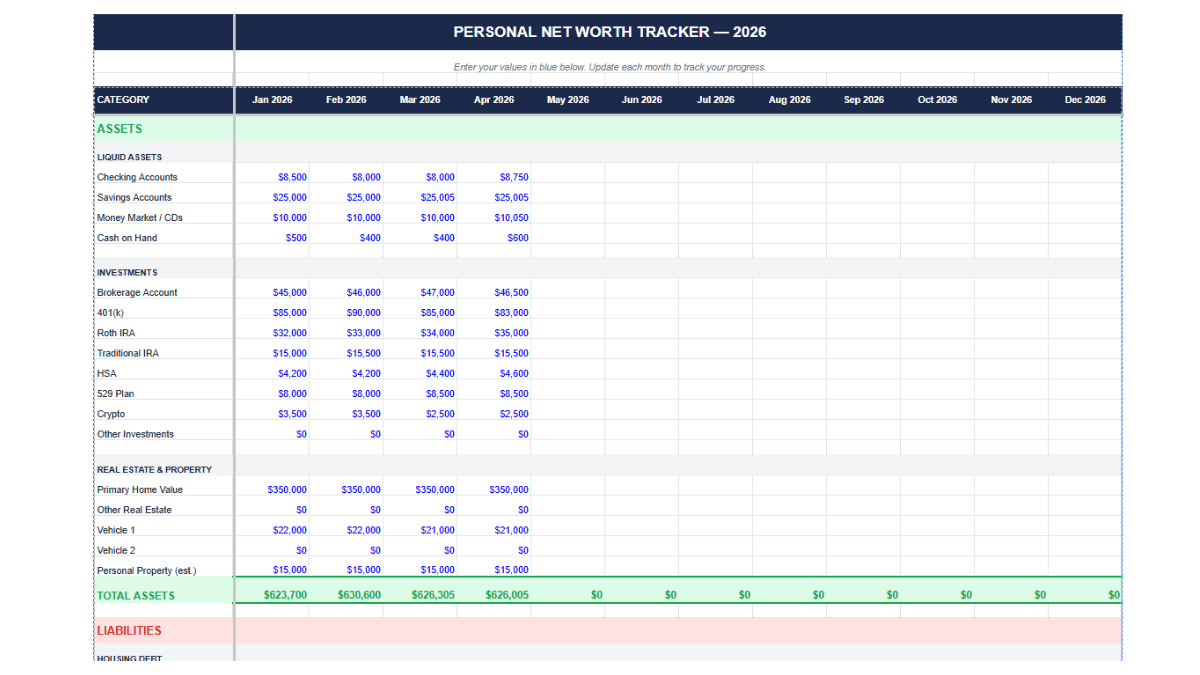
The tracker tab pulls from your data entries and gives you a summary view of total assets, total liabilities, and net worth for each month.
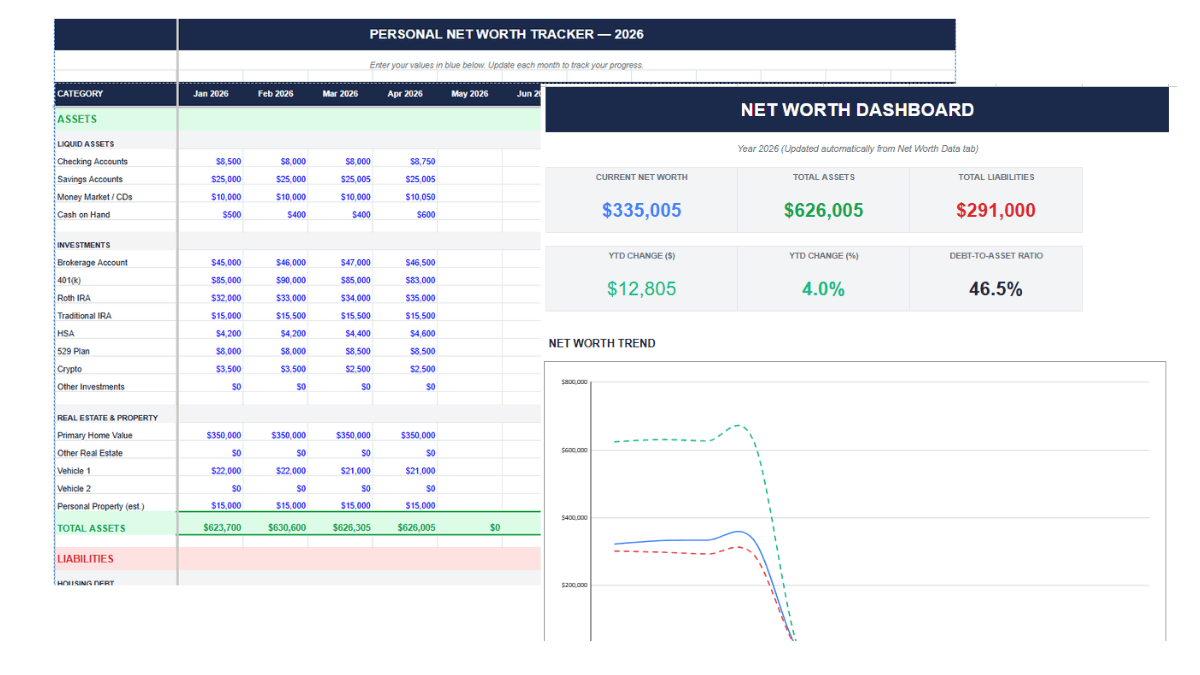
If you use Microsoft Excel, make your copy in Sheets first, then go to File > Download > Microsoft Excel (.xlsx). The formulas carry over.
How to Build a Net Worth Spreadsheet From Scratch
The template handles this for you, but if you want to understand the mechanics or customize the layout, here is how to build one yourself.
Set Up Monthly Columns
Open a new Google Sheets file. Use Column A for your category labels. Columns B through M represent January through December. This gives you a full year of monthly tracking in one view.
List Your Asset and Liability Categories
Create two sections: one for assets and one for liabilities. Under each, list the specific accounts you hold. Here are the most common categories:
Assets: checking accounts, savings accounts, retirement accounts (401k, IRA, Roth IRA), brokerage and investment accounts, real estate (current market value), vehicles, HSA balance, cash value of life insurance, cryptocurrency, business equity.
Liabilities: mortgage balance, auto loans, student loans, credit card debt, personal loans, medical debt, HELOC balance.
Use the categories that match your actual accounts. If you don’t have student loans, skip that row. If you own rental property, add a row for it. The spreadsheet works for you, not the other way around.
Add SUM Formulas for Totals
Select the cell where you want total assets to appear. Enter =SUM(B2:B9) and adjust the range to cover your asset rows. Do the same for total liabilities. Copy both formulas across the entire row so every month column calculates automatically.
Calculate Net Worth
Add a row labeled “Net Worth” and enter the formula =B11-B6, where B11 is total assets and B6 is total liabilities. Copy it across all month columns. Each cell now shows your net worth for that month.
That is the entire structure. Open it on the first of each month, update your balances, and the formulas handle the math.
Track Your Net Worth Growth Rate
Knowing your net worth is useful. Knowing the rate of change is more useful. Add a row beneath your net worth calculation and enter:
=(C22-B22)/ABS(B22)
Format the cell as a percentage. This gives you the month-over-month change, and over a full year, you can see which months drove the biggest gains or losses. That pattern usually maps to your cash flow: months with large irregular expenses or windfalls show up clearly here.
Add a Chart to See the Trend
A line chart is the best format for net worth tracking because it shows direction over time. Go to Insert > Chart, set the data range to your month labels and net worth row, and select Line chart as the type.
You can add additional series for total assets and total liabilities to see all three lines on the same chart. Label the Y axis “Dollar Amount” and the X axis “Month.” Conditional formatting on the net worth row (green for positive, red for negative) adds a quick visual signal when scanning the raw numbers.
Use GOOGLEFINANCE to Auto-Update Investment Values
If you hold stocks, ETFs, or index funds, the GOOGLEFINANCE function pulls live prices directly into your spreadsheet. Enter:
=GOOGLEFINANCE(“VTI”,”price”)
Replace “VTI” with whatever ticker you hold. Multiply by your share count to get a current position value. This is particularly useful for retirement accounts and brokerage accounts where holdings change in value daily. You still enter the balance manually on update day, but GOOGLEFINANCE gives you a live reference to check against.
Why a Spreadsheet Instead of an App
Apps like Empower and YNAB track net worth automatically by syncing with your bank accounts. They are good tools, and I have used them.
A spreadsheet does something different. Manually entering your balances forces you to look at every account. You notice the credit card debt that crept up over two months. You see the retirement account that hasn’t been funded since October. The act of typing the numbers builds a kind of awareness that automated syncing skips over.
A spreadsheet also gives you full control. You can add a cash flow sheet tab alongside your tracker. You can build a monthly budget in the same file. You can connect it to an expense tracker in another tab. No app dictates your categories or layout. For people working toward financial independence, or FI, a net worth spreadsheet is the scoreboard. Pair it with an investment tracking spreadsheet and a retirement planning spreadsheet and you have a full personal finance dashboard in Google Sheets.
What Net Worth Actually Tells You
Net worth is total assets minus total liabilities. It works as a net worth calculator for your entire financial life, compressed into a single number.
A positive number means you own more than you owe. A negative number means the opposite, and that is common early in life when student loans and auto loans outweigh savings. A negative net worth isn’t a crisis by default. The direction matters more than any single snapshot.
One thing people get wrong: treating daily spending as liabilities. Your grocery bill and coffee habit are expenses. Liabilities are debts with an outstanding balance: mortgage, student loans, credit card debt, car loan. The distinction matters when you are building your spreadsheet categories.
Average and Median Net Worth by Age
Context helps. The most comprehensive data comes from the Federal Reserve’s 2022 Survey of Consumer Finances, released in October 2023. The next update is expected in late 2026.
Average net worth gets pulled upward by extremely wealthy households, so median (the midpoint where half of households fall above and half below) is a more realistic benchmark for most people.
| Age Group | Median Net Worth | Average Net Worth |
|---|---|---|
| Under 35 | $39,000 | $183,500 |
| 35 to 44 | $135,600 | $549,600 |
| 45 to 54 | $247,200 | $975,800 |
| 55 to 64 | $364,500 | $1,566,900 |
| 65 to 74 | $410,000 | $1,794,600 |
| 75+ | $335,600 | $1,624,100 |
Source: Federal Reserve Survey of Consumer Finances, 2022.
Net worth typically grows through working years as people pay down debt, build home equity, and accumulate savings in retirement accounts and investment portfolios. It often dips after 75 as retirees draw down assets to cover living expenses. If you are in your 20s or 30s with a negative net worth, you are in a normal position. The spreadsheet is how you start changing the trajectory.
Tips for Maintaining Your Net Worth Spreadsheet
Keep an unedited copy of your blank template. When you start a new year, duplicate the sheet rather than overwriting old data. Your historical data is part of the value.
Don’t overwrite formula cells. If a total looks wrong, check the formula in the formula bar before editing the cell directly.
Update on a consistent schedule. The first of each month works well. Set a recurring calendar reminder so it becomes routine rather than something you forget for three months and then scramble to reconstruct.
Double-check every balance you enter. A typo in one cell ripples through your totals and your chart, and you might not catch it until the trend line does something strange months later.
For a broader view of your finances in Google Sheets, combine your net worth tracker with a budget template, a debt payoff spreadsheet, and an investment tracker.
Frequently Asked Questions
How often should I update my net worth spreadsheet?
Once a month is the right cadence for most people. Pick a date, like the first of the month, and update all your account balances in one sitting. More frequently than monthly adds noise. Less frequently than quarterly means you lose the ability to spot trends while they are still actionable.
Should I include my home value in my net worth?
Yes. Your home is an asset and its current market value belongs on the asset side of your spreadsheet. Subtract your remaining mortgage balance on the liabilities side. The difference is your home equity, which is part of your net worth. Use a conservative estimate from Zillow or Redfin rather than what you hope it is worth.
What is the difference between average and median net worth?
Average adds up everyone’s net worth and divides by the total number of people. A few extremely wealthy households push this number much higher than what most people actually have. Median is the midpoint where exactly half of households fall above and half below. Median is the better benchmark for comparing yourself to a typical household.
Can I use this net worth template in Microsoft Excel?
Yes. Open the Google Sheets template, go to File > Download > Microsoft Excel (.xlsx), and save the file. All formulas and formatting carry over. You can also build the spreadsheet from scratch in Excel using the same steps covered in this guide.
What is the difference between net worth and income?
Income is money earned over a period of time, like a monthly salary. Net worth is the total value of what you own minus what you owe at a single point in time. A high income does not guarantee a high net worth, and people with modest incomes can build significant wealth over time through consistent saving and investing.
How do I track investment values automatically in Google Sheets?
Use the GOOGLEFINANCE function. Enter =GOOGLEFINANCE(“TICKER”,”price”) in a cell to pull the live price of a stock or ETF. Multiply by the number of shares you own to get your current position value. See the GOOGLEFINANCE function guide for a full walkthrough.
Should I track net worth individually or as a household?
If you share finances with a partner, tracking household net worth gives you the full picture. If you keep finances separate, track individually. Some couples do both. A couples finance spreadsheet can help with the combined view.
What counts as an asset vs. a liability?
Assets are anything you own with monetary value: cash, savings, investments, real estate, vehicles, retirement accounts. Liabilities are debts you owe: mortgages, student loans, auto loans, credit card balances, personal loans. Daily expenses like groceries and subscriptions are not liabilities.