
The last time I was actively job hunting, I kept everything in my head for about two weeks before it stopped working. I had applied to maybe a dozen positions and could not tell you, on any given day, which ones I had heard back from, which ones needed a follow-up, or which interview I had scheduled for Thursday.
I built a spreadsheet. It took about twenty minutes and fixed the problem immediately.
The tracker below is a cleaner version of what I put together then. Three tabs, pre-loaded dropdowns, auto-fill columns. It covers the full job search timeline from first application to final outcome. If you want to skip straight to the template, grab it here:
Get the Free Job Tracker Template
Three organized tabs. Pre-loaded dropdowns. Auto-fill columns. Start tracking in minutes:
(Google Sheets & Excel Compatible — last updated April 2026)
What a Job Application Tracker Spreadsheet Actually Does
It records where you applied, when you applied, who you contacted, what interviews are on your timeline, and what came of each one. That’s it. The value is having all of it in one place instead of split across email threads, browser history, and memory.
Most people manage this fine up to about five applications. At fifteen it starts to break down. At thirty, it’s genuinely hard to stay organized without a system. The average job seeker submits somewhere between 100 and 200 applications before landing a role, with a search timeline of three to six months. At that volume, the spreadsheet isn’t optional.
It also gives you something a little more useful than memory: a view of your search as a whole. Which sources are actually producing interviews? Which companies have gone quiet? Where on the timeline are you spending the most time waiting? The tracker answers those questions without any extra work because the data is already there.
What to Track at Every Stage
The fields that matter vary depending on where an application sits. Here’s what belongs in each phase:
| Stage | Data Points to Track |
|---|---|
| The Job Listing |
|
| Pre-Interview |
|
| The Interview |
|
You can add columns for salary expectations, referral source, or a gut-feel rating for each role. The template covers the essentials. You customize from there. For more starting points, see our broader collection of Google Sheets templates.
Why This Template Instead of Building Your Own
Building from scratch takes time that isn’t the job search. The formatting, the formulas, the dropdown logic — it’s all done here. You open it and start entering applications.
A few things worth knowing about how it’s set up:
Three Tabs, One Timeline
The template separates your search into three tabs: Job Details, Pre-Interview, and Interviews. Each one corresponds to a phase. A job starts in the first tab when you’re interested. It moves to the second tab when you apply. It moves to the third when you’re called in. Your view at each stage stays clean because you’re only looking at what’s relevant to that phase.
Pre-loaded Dropdowns
Common statuses — Applied, Followed Up, Rejected, Ghosted — are already in drop-down lists. Employment type and interview mode use the same approach. You click to update instead of typing the same words repeatedly across fifty rows.
Auto-fill Between Tabs
When a job moves from Job Details to Pre-Interview, the key fields carry over. Company name, contact details, role title — you don’t re-enter any of it.
Built-in Follow-up and Deadline Tracking
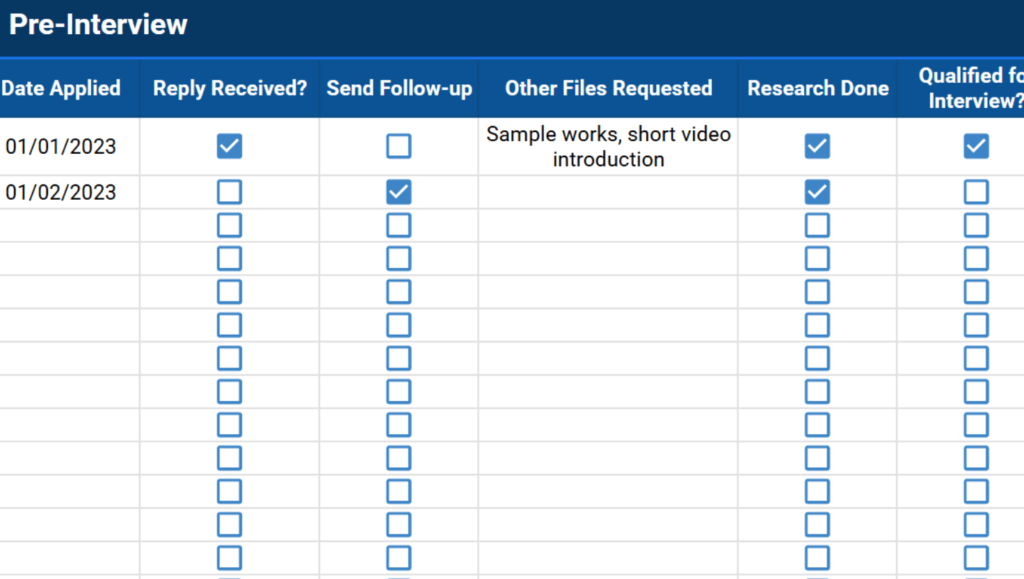
The Pre-Interview tab has checkboxes for “Reply Received” and “Send Follow-up.” These are your deadline reminders. If you applied a week ago and the reply box is still empty, that’s your signal to follow up. It doesn’t require any separate calendar system. The tracker is the reminder.
Shareable
Because it lives in Google Sheets, you can share it with a career counselor or mentor via a link. Set them as a Viewer if you just want a second set of eyes on your timeline. Set them as an Editor if you want them leaving notes directly in the sheet.
How to Use the Job Tracker
Step 1: Make a Copy
Click the template link and select File > Make a copy. It saves to your Google Drive and you can edit it freely — the original is untouched. If you want Excel instead, go to File > Download > Microsoft Excel (.xlsx) after copying. Everything transfers correctly.
Step 2: Fill in the Job Details Tab
This is your inbox. Add every role you’re considering, even the long shots. Enter the company name, posting URL, recruiter contact, salary range, application deadline, and employment type. The Type and Mode dropdowns let you categorize quickly.
The goal here is visibility. Seeing fifteen roles in one view helps you prioritize your timeline. Which deadlines are coming up this week? Which roles fit best? You make better decisions with the full picture in front of you than you do application by application.

Step 3: Move to Pre-Interview After You Apply
Once an application goes out, it moves to this tab. Key fields from Job Details carry over automatically. The date-applied column starts your follow-up timeline. Seven business days with no reply and an unchecked “Reply Received” box is a straightforward signal: follow up today.
This tab also logs which resume version and cover letter you sent. When a hiring manager calls, you’ll know exactly what they’re looking at.

Step 4: Track Each Interview as a Milestone
Each interview round gets logged here: date, format, notes from the conversation, and current status. The Status column covers First Interview, Second Interview, Offer, and Rejected. Move it forward as things progress.
The Notes field is where this tab earns its keep. Write down what the interviewer raised, questions you want to ask in the next round, and anything that felt significant. The morning of a second interview, with one week of other applications in between, is a bad time to be pulling details from memory. Having them in the sheet means you don’t have to.

Step 5: Customize for Your Search
The default fields cover what most searches need. You can extend the tracker without breaking anything — add a referral source column to track which job boards are actually producing interviews, a salary expectation column, or a personal ranking for how interested you are in each role. Add columns wherever they make sense. The dropdowns and auto-fill logic in other columns continue to work.
If you’re also tracking deliverables at a current job while you search, the project management spreadsheet template handles that separately. And if you’re still in school managing applications alongside coursework and other deadlines, the college application spreadsheet is built for that specific workflow.
Start With One Tab
Open the Job Details tab, add five roles you’re considering right now, and fill in their deadlines. That’s it for day one. The structure of the whole system becomes obvious once the data is in there. Most people figure out the Pre-Interview and Interviews tabs on their own within the first week.
Frequently Asked Questions
What is the best way to track job applications?
A spreadsheet. It keeps applications, deadlines, contact names, and interview timelines in one place and updates quickly as things change. It also surfaces patterns over time — which job boards are producing callbacks, how long your average timeline is between application and response — without any extra work, because the data is already there.
Can I use this job tracker in Microsoft Excel?
Yes. Make a copy of the Google Sheet, then go to File > Download > Microsoft Excel (.xlsx). All tabs, dropdowns, and formatting transfer correctly.
How do I make a copy of the Google Sheets template?
Click the template link. Google Sheets will prompt you to make a copy to your Google Drive. Click “Make a copy.” It saves immediately and you can rename it anything you want. The original is unaffected.
What should I do if a company never responds?
Send one follow-up five to seven business days after applying. Send a second one a week after an interview if you’ve heard nothing. After two unanswered follow-ups, mark the application Ghosted and move on. The tracker makes it easy to see which companies have gone quiet and which ones are still worth watching.
Can I share this spreadsheet with a career coach or mentor?
Yes. Share via link. Set them as Viewer if you want them to see your progress and timeline without editing. Set them as Editor if you want them leaving notes directly in the sheet.
How many jobs should I apply to per week?
Ten to fifteen is a reasonable milestone for an active search, though a tailored application consistently outperforms a mass-apply strategy. Use the Job Details tab to queue roles ahead of time so you’re not deciding what to apply to and writing the application on the same day.
What is the difference between the Pre-Interview and Interviews tabs?
Pre-Interview covers everything between submitting and getting called: follow-up deadlines, reply tracking, documents sent. The Interviews tab takes over once a company reaches out. Each round gets its own row with date, format, notes, and status.
Can I add more columns to customize the tracker?
Yes. The template is fully editable once you make a copy. Add columns anywhere — referral source, salary expectation, personal ranking for the role. The existing dropdowns and auto-fill logic in other columns are not affected.