
Senior year has two speeds. The first is the fall sprint, applications, tests, essays, everything at once. The second is this part, the quiet stretch where you can either clean up free money or let it slip because you are tired of forms. After all, February is when scholarships stop feeling so theoretical.
It’s also the time of year when many families lose track. After all, scholarships are scattered across portals, emails, PDFs, and school counselor notes that never become a system.
A scholarship tracker fixes that. It turns the chaos into a list you can work through, one submission at a time, without guessing what is missing.
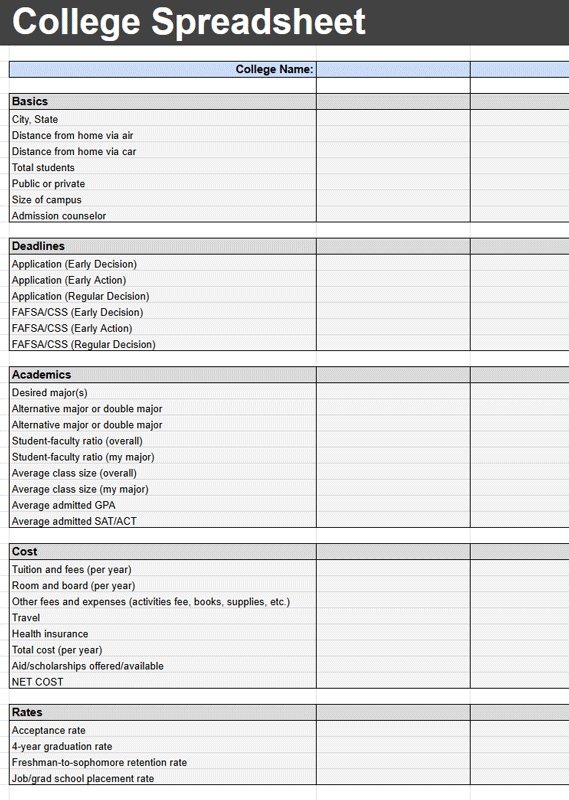
If you already have a college application spreadsheet going, you’re 80 percent of the way there. You can either add a scholarship tab to it, or keep scholarships separate.
And tracking software doesn’t have to be expensive. That’s why we love Google Sheets. And this College Application Spreadsheet is a good starting point.
Why this matters right now
February is a leverage month. A lot of scholarship deadlines land between now and early spring, and many applications ask for the same core materials, resume details, activity lists, short essays, transcripts, and recommendation contacts. If you build a tracker now, every additional application gets easier.
The other reason is emotional. Seniors are busy, parents are busy, and nobody wants to start a scholarship at 9:30 p.m. only to discover the deadline is tomorrow and the transcript request takes three days. The tracker prevents last-minute surprises.
The scholarship tracker, minimum version
You do not need a complicated system. You need a spreadsheet that answers five questions at a glance: what is due, what is worth doing, what is missing, who owns the next step, and what was submitted.
Create a sheet with these columns:
- Scholarship name
- Link or portal name
- Deadline date
- Estimated time to complete
- Award amount
- Eligibility notes
- Requirements checklist
- Status
- Next action
- Owner (student, parent, counselor)
- Submitted date
- Confirmation received (yes or no)
If you want a clean way to manage deadlines like a project, this assignment-tracking spreadsheet template works well as the backbone, then you customize columns for scholarship.
Make February easier with three simple fields
1) A real deadline column
Use an actual date, not a note like mid-Feb. Then sort by deadline. The goal is to see your next ten actions instantly.
2) A status dropdown
Keep it simple: Not started, In progress, Waiting on document, Submitted, Confirmed, Rejected, Awarded. When you see a lot of Waiting on document, you know what is actually blocking you.
3) A next action column
This is the most important column. It should be a single verb. Draft essay. Request transcript. Ask for recommendation. Create account. Submit form. Without next action, a tracker becomes a graveyard.
How to set it up in 10 minutes
- Open a blank sheet and paste the columns above.
- Add a dropdown for Status.
- Freeze the header row so the labels stay visible.
- Enter every scholarship you already know about, even if you think you will not apply.
- Sort by deadline.
- Pick your top five targets and fill in the Requirements checklist and Next action.
If you prefer starting from a calendar-style layout, use a template to plan the week, then link back to your tracker. These calendar spreadsheets are made for quick scheduling
How to choose what to apply for in February
Most seniors do not need more scholarships. They need fewer scholarships, done well.
Use this simple filter:
- Deadline soon, and you can complete it in under 90 minutes, do it.
- High award amount, even if it takes longer, do it if you meet the eligibility cleanly.
- Scholarships that reuse an essay you already have, do them in batches.
- Anything that requires a brand-new recommendation letter with no notice, push it out unless the award is large.
Add a Priority column if you want this to be automatic. Use 1, 2, 3 where 1 means do this week.
Build a document hub once, then reuse it
The real scholarship advantage is reuse. Most applications ask for the same pieces, and redoing them from scratch is where people burn out.
Create one folder in Google Drive, then store:
- Resume or activities list
- Unofficial transcript PDF
- A list of awards and extracurriculars, with dates and roles
- Your most common short answers in a single doc, like tell us about yourself and why this major
- A master essay bank, even if it is only two essays
- Recommendation contact list, with emails and when you last asked
Then in your tracker, add a link to the folder and a note about which essay version you used. That makes it easy to revise instead of restarting.
Quick FAQ
Should scholarships live in the same sheet as college applications?
Either works. If you already use a college application tracker, adding a scholarship tab is usually easier. If scholarships are overwhelming, a separate sheet keeps the focus clean.
What if I miss a deadline?
Keep it in the tracker anyway. Mark it missed, then look for similar scholarships with later deadlines. The tracker is a system for next time, not a judgment.
How many scholarships should I apply for in February?
A realistic target is two to five per week, depending on how heavy school is. The point is consistency, not a single weekend sprint.
Conclusion
February is when scholarship money is still available, but attention is fading. A tracker gives you leverage because it keeps you moving even when motivation drops.
Set up the sheet once, then do one submission a day for a week. You will be shocked how quickly the pile shrinks when the next action is clear.