
So many arguments come down to money. Couples argue because budgets tend to live in someone’s memory, and memory isn’t an efficient way to track spending.
The fight usually starts the same way. There’s a grocery run nobody remembers, a bill on autopay, a quick Venmo that never happened, or a growing sense that one person keeps fronting the costs.
That’s one reason I love spreadsheets. It’s a perfect system for household infrastructure. Make the rules obvious, keep the tracking lightweight, and make the money as boring as possible.
Rules first, receipts second. Once you agree on how you split, the spreadsheet becomes a quiet referee that keeps you from re-litigating the same conversation every week.
Choose a split rule you can live with
Pick one default rule, write it down in your “Settings” tab, and use it for everything shared unless you both agree to make an exception. If you decide per purchase, every transaction becomes a negotiation.
- 50/50 split, best when incomes and spending habits feel similar
- Proportional-to-income split, best when incomes differ meaningfully
- Category-based split, best when you want rent handled one way and groceries handled another
If you want a fast start, build your couples sheet on top of an existing tracker, then add your split logic on top. The Google Sheets expense tracker template on SpreadsheetPoint gives you a clean place to log spending and summarize categories without designing everything from scratch.
Build the spreadsheet around four tabs
You do not need a complex workbook. You need four tabs that match real life and prevent “who paid?” from turning into a weekly debate.
1) Settings
- Partner names
- Split method (50/50, proportional, category-based)
- Income inputs (only if you use proportional)
- Category list (rent, utilities, groceries, dining, subscriptions, childcare, medical, household, travel, etc.)
- Shared or personal toggle for each category
- Optional: category split percentages (for category-based splitting)
2) Transactions
This is the only place you enter purchases. If you make this tab easy, you will keep using it.
- Date
- Merchant
- Category (dropdown)
- Amount
- Paid by (dropdown)
- Shared? (yes or no, defaulted from category)
- Notes (optional)
3) Split Summary
This is where the spreadsheet earns its keep. It turns transactions into a single answer, what each person owes, what each person already paid, and what transfer settles the month.
4) Settle-Up Log
Without a log, you end up arguing about whether a payment happened. Keep it simple, date, amount, from, to, method, and which month it covers.
Make the spreadsheet answer the only question that matters
Every couple’s money talk eventually collapses into one practical question, what single transfer makes us even.
Your summary tab should calculate four totals for the selected month:
- Total shared spending
- Total paid by Partner A
- Total paid by Partner B
- Each partner’s fair share under your split rule
From there, the “settle-up” number is straightforward:
- Partner A net = (Partner A share) minus (Partner A paid)
- Partner B net = (Partner B share) minus (Partner B paid)
One net will be positive and one will be negative. The positive number tells you who needs to send money, and how much, to settle the month.
Use one of these three split methods, and stop debating fairness mid-month
There are three easy ways to split finances as a couple. Once you have your spreadsheet set up, consider each to find the one that works best for you both.
Option A: 50/50 split
This is the cleanest approach. It also forces clarity about what counts as “shared,” which matters more than people think.
Option B: Proportional-to-income split
If one person earns more, proportional splits often feel calmer over the long haul because neither person feels punished for earning, or constantly behind for earning less. You are splitting shared costs by percentage, not by guesswork.
Option C: Category-based split
This is the most realistic for many households. Rent and childcare may be proportional, groceries may be 50/50, and personal spending stays personal. The key is writing it down once, then letting the spreadsheet apply it consistently.
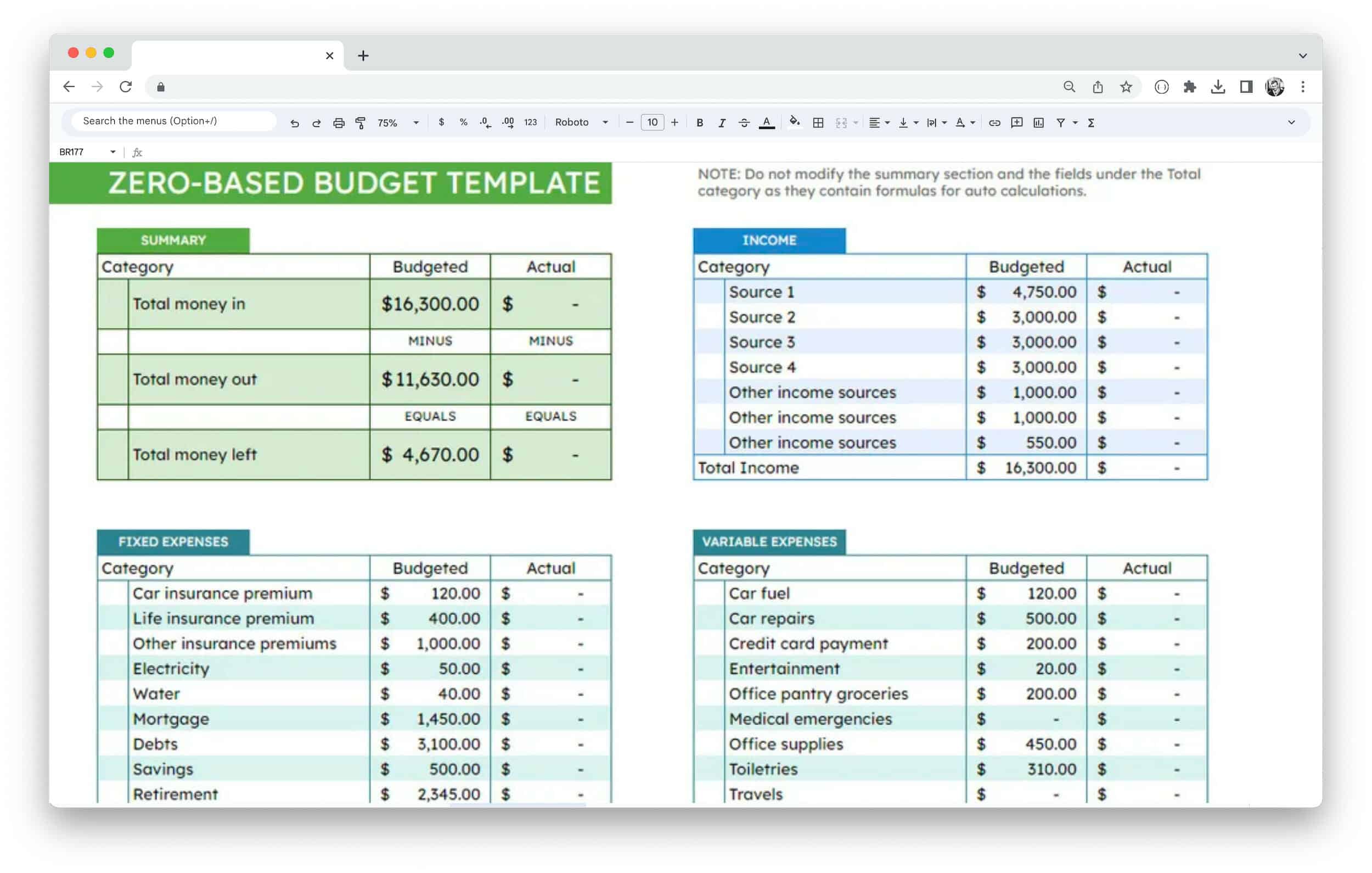
If you want more structure for the bigger picture, it helps to pair your couples sheet with a broader monthly plan. This Google Sheets budget template roundup lets you choose a layout that fits your household, then link your shared categories to the way you already budget.
Guardrails that prevent arguments
Define “shared” categories with embarrassing clarity
Most resentment hides inside vague categories. Groceries turn into solo lunches. “Household” turns into personal upgrades. Fix it by agreeing on which categories are shared, and by giving both people a personal category they can use without commentary.
Put subscriptions on a short list you review on purpose
Subscriptions create silent scorekeeping because they are easy to forget and easy to justify. Add a small table in your Settings tab with subscription name, monthly cost, paid by, shared or personal, and renewal date if you know it.
If you want a quick way to catch the ones you forgot, try finding hidden subscriptions using a bank CSV pairs well with a couples tracker, because it helps you surface recurring charges before they turn into a surprise argument.
A five-minute routine that keeps the spreadsheet alive
The spreadsheet fails when it becomes a courtroom. Keep it small, keep it predictable, and keep it regular.
- Weekly, 5 minutes: both partners add missing transactions, categorize anything unclear
- Monthly, 15 minutes: review totals, settle up once, log the transfer
- Quarterly, 30 minutes: revisit the split rule if income, rent, childcare, or debt goals changed
Here’s an example. Say your shared spending for the month totals $3,100. Partner A paid $1,900 and Partner B paid $1,200.
- If you split 50/50, each partner owes $1,550. Partner B sends $350 to settle up.
- If you split 60/40, Partner A owes $1,860, and Partner B owes $1,240. Partner B sends $40 to settle up.
Notice what changed. Done correctly, the conversation stops being about who is paying more and becomes a single transfer based on an agreed-upon rule. That keeps it calm.
FAQ
Should couples split expenses 50/50?
Sometimes. If incomes and lifestyles feel similar, 50/50 stays simple and predictable. If incomes differ, proportional or category-based splits often feel fairer over time.
What is the best way to split expenses when one partner earns more?
Proportional-to-income tends to create the least friction because it scales with reality. The higher earner contributes more to shared costs without turning every purchase into a debate.
How often should we settle up?
Once a month works for most households. Weekly settle-ups can feel like constant accounting, and quarterly settle-ups can feel like a surprise bill.
What counts as a shared expense?
Anything you both benefit from and agree belongs in the household bucket, rent, utilities, groceries, and shared subscriptions are common. The important part is writing it down and using the same rule each time.
How do we handle personal spending without judgment?
Give each partner a “personal” category and treat it as private by default. Shared systems work better when they leave room for autonomy.
What if we forget to log transactions?
That is normal. Set a weekly five-minute check-in, add what you missed, then move on. The goal is consistency, not perfection.
How do we avoid fighting about subscriptions?
Make subscriptions visible. Keep a short subscription list, review it monthly, and decide which ones still earn their spot.
Should we combine bank accounts?
Plenty of couples do, plenty do not. A shared spreadsheet works either way because it tracks responsibility, not relationship structure.
Can we run this in Excel instead of Google Sheets?
Yes. The same structure applies. Settings, Transactions, Summary, Settle-Up Log. Google Sheets adds easier collaboration, and Microsoft Excel can work well if that is already your default tool.
If you want to keep the setup lightweight, start with a tracker template, add your split rule, and commit to the monthly settle-up. Over a year, the real benefit is less math, less mind-reading, and fewer arguments that start with “I thought you had it.”